ಬೆಂಗಳೂರು, ನ.22: ನಗರದಲ್ಲಿ ಭಾನುವಾರ ರಾತ್ರಿಯೂ ಧಾರಾಕಾರ ಮಳೆ ಸುರಿದಿದ್ದು, ಸಾಕಷ್ಟು ಅವಾಂತರ ಸೃಷ್ಟಿ ಮಾಡಿದೆ. ರಸ್ತೆಯಲ್ಲಿ ಮಳೆ ನೀರು ನುಗ್ಗಿದ್ದರಿಂದ ನಗರದ ಹಲವೆಡೆ ತಡರಾತ್ರಿಯವರೆಗೂ ಟ್ರಾಫಿಕ್ ಜಾಮ್ ಉಂಟಾಗಿತ್ತು.
ಸತತ ಮೂರು ತಾಸು ಸುರಿದ ಮಳೆಗೆ ಸಿಲಿಕಾನ್ ಸಿಟಿ ಜನ ಹೈರಾಣಾಗಿದ್ದಾರೆ. ಸಂಜೆ 6 ರಿಂದ 9 ಗಂಟೆಯವರೆಗೆ ಮಳೆ ಸುರಿದಿದೆ. ನಗರದ ಹಲವು ರಸ್ತೆಗಳು ಮಳೆ ನೀರಿನಿಂದಾಗಿ ಕೆರೆಗಳಂತಾಗಿದ್ದವು. ಪೀಣ್ಯ, 8ನೇ ಮೈಲಿ ರಸ್ತೆಯಲ್ಲಿ ಐದಾರು ಅಡಿಯಷ್ಟು ನೀರು ನಿಂತಿದ್ದರಿಂದ ಟ್ರಾಫಿಕ್ ಜಾಮ್ ಉಂಟಾಗಿ ವಾಹನ ಸವಾರರು ತಡರಾತ್ರಿವರೆಗೂ ಪರದಾಟ ನಡೆಸಿದರು.
ಪ್ಯಾಲೆಸ್ ರಸ್ತೆ, ಯಲಹಂಕ, ವಿದ್ಯಾರಣ್ಯಪುರ ಮುಖ್ಯ ರಸ್ತೆಯಲ್ಲಿ ಟ್ರಾಫಿಕ್ ಜಾಮ್ ಉಂಟಾಗಿ ಇಲ್ಲಿ ರಾತ್ರಿ 12 ಆಗಿದ್ದರೂ ಸಹ ಟ್ರಾಫಿಕ್ ಜಾಮ್ ಕಂಡುಬಂತು. ರಸ್ತೆಯಲ್ಲಿ ಮೊಣಕಾಲು ಮಟ್ಟದವರೆಗೂ ನೀರು ನಿಂತಿದ್ದರಿಂದ ಬಹುತೇಕ ಕಾರು, ಬೈಕ್ಗಳು ರಸ್ತೆಯಲ್ಲಿಯೇ ನಿಂತಿದ್ದವು. ಯಲಹಂಕ ಪೊಲೀಸ್ ಠಾಣೆ ಸಮೀಪ ಮಳೆ ನೀರು ಕೆರೆಗೆ ಹೋಗದೆ ರಾಜಕಾಲುವೆಗೆ ರಸ್ತೆಗೆ ನುಗ್ಗಿದ್ದವು. ನಾಲ್ಕೈದು ಬಿಎಂಟಿಸಿ ಬಸ್ಗಳು ರಸ್ತೆಯಲ್ಲಿಯೇ ಕೆಟ್ಟು ನಿಂತಿದ್ದವು.
ಯಲಹಂಕ ಕೋಗಿಲು ಬಳಿ ಬೆಳಗ್ಗೆಯಾದರೂ ರಸ್ತೆಯ ಮೇಲೆ ನೀರು ಹಾಗೇ ನಿಂತಿತ್ತು. ಸುಮಾರು ನಾಲ್ಕು ಅಡಿಯಷ್ಟು ನೀರು ನಿಂತಿದ್ದರಿಂದ ರಸ್ತೆ ಮಧ್ಯೆ ಹೆಚ್ಚಿನ ವಾಹನಗಳು ಕಟ್ಟು ನಿಂತಿದ್ದವು. ಸೋಮವಾರ ಆದ್ದರಿಂದ ಹೆಚ್ಚಿನ ಜನದಟ್ಟಣೆ ಈ ರಸ್ತೆಯಲ್ಲಿ ಇದ್ದರಿಂದ ಸಹ ಟ್ರಾಪಿಕ್ ಜಾಮ್ಗೆ ಕಾರಣವಾಯಿತು. ಇನ್ನು ಯಲಹಂಕ ಫ್ಳೈ ಓವರ್ ಕೆಳಗೂ ಸಹ ವಾಹನಗಳು ಮುಳುಗುವಷ್ಟು ನೀರು ನಿಂತಿದ್ದವು.
Silicon City Bengaluru people have been raining for three consecutive days. Rain is pouring in from 6pm to 9pm. Many of the city's roads were ditched by rain water. Motorists were hit late into the night by a traffic jam as they were standing under five feet of water on the 8th mile road.
Notifications
Settings
Clear Notifications
No New Notifications
Notifications
Use the toggle to switch on notifications
Block for 8 hours
Block for 12 hours
Block for 24 hours
Don't block
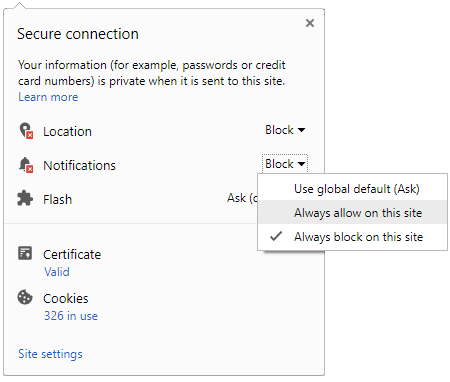
To start receiving timely alerts, as shown below click on the Green “lock” icon next to the address bar
Click it and Unblock the Notifications
Close X
Close X
To Start receiving timely alerts please follow the below steps:
Click on the Menu icon of the browser, it opens up a list of options.
Click on the “Options ”, it opens up the settings page,
Here click on the “Privacy & Security” options listed on the left hand side of the page.
Scroll down the page to the “Permission” section .
Here click on the “Settings” tab of the Notification option.
A pop up will open with all listed sites, select the option “ALLOW“, for the respective site under the status head to allow the notification.
Once the changes is done, click on the “Save Changes” option to save the changes.



 Click it and Unblock the Notifications
 Sign in with Google